Interactive flat panels
Interactive Flat Panels
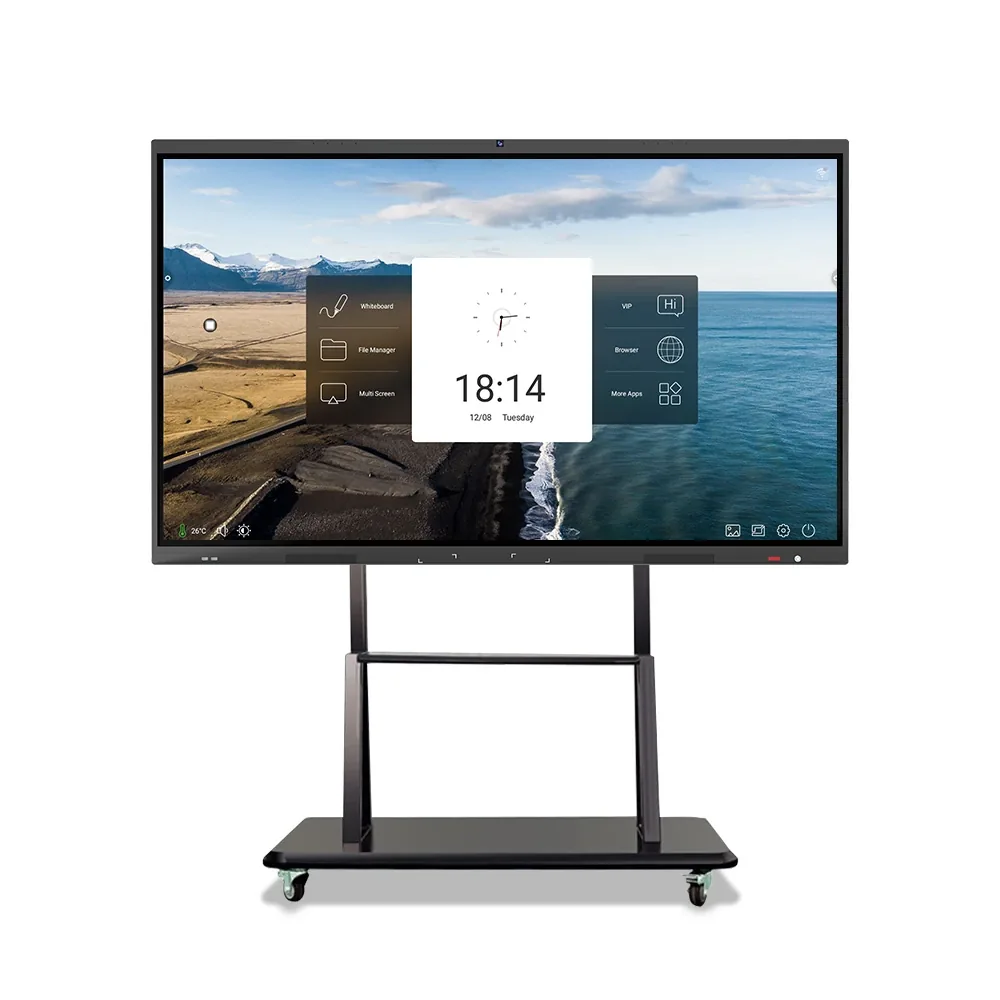
55–86-inch 4K interactive panels with IR or PCAP touch, Android, Windows or dual-system players, built-in camera and array microphone options, and a movable bracket.
Last reviewed:
Pricing depends on screen size, brightness, player platform, touch option, enclosure and order quantity. Request a quotation for the current price.
Model-level pricing · Drawings on request · Reply within one business day
Configure in 5 questions- Screen size
- 55–86 inch
- Resolution
- 3840×2160
- Brightness
- 350 cd/m²
- Touch
- IR or PCAP (optional)
- Player platform
- Android / Windows / dual
- Peripherals
- Camera, array mic, movable bracket
Available models and configurations
4 models
Specifications are indicative. Confirm the final configuration on the quotation.
Select a model code to request that exact configuration.
View model photos & drawings| Model | Screen size | Resolution | Brightness | Touch | Player platform |
|---|---|---|---|---|---|
| SD-G550H | 55" | 3840×2160 | 350 cd/m² | IR / PCAP optional | Android / Windows / Dual |
| SD-G650H | 65" | 3840×2160 | 350 cd/m² | IR / PCAP optional | Android / Windows / Dual |
| SD-G750H | 75" | 3840×2160 | 350 cd/m² | IR / PCAP optional | Android / Windows / Dual |
| SD-G860H | 86" | 3840×2160 | 350 cd/m² | IR / PCAP optional | Android / Windows / Dual |
The datasheet lists Wi-Fi as standard and 4G/5G as optional. Camera, array microphone and movable bracket are peripheral options; confirm the final bundle on the quotation.
Scroll horizontally to see all columns
Specifications are indicative and may be updated by the manufacturer without notice. The quotation and approved sample prevail.
Models & visuals
Models, photos and drawings.
Only models with a confirmed product photo, installation reference or dimension drawing are shown here. Request the matching file for any other model.
Series referenceModel files on request.
The series photo shows the product format. Tell us the model code and we will send the matching photo, drawing and specification sheet.
SD-G550H · SD-G650H · SD-G750H · SD-G860H
Other model photos and drawings are available with the quotation.
Selection support
Not sure which model fits?
Send the installation environment, screen size and quantity. We will reply with a short model list and the reason each model fits.
Family overview
What this configuration is for.
Pricing depends on screen size, brightness, player platform, touch option, enclosure and order quantity. Request a quotation for the current price.
An interactive flat panel replaces a projection screen, whiteboard and video-call display with one surface. The family covers 55–86 inches, which fits small meeting rooms through lecture theatres and training rooms.
All four models use a 3840×2160 panel at 350 cd/m², with IR or PCAP touch as an option. Player configurations include Android, Windows and dual system. The datasheet also lists camera, array microphone and movable bracket as peripherals, plus Wi-Fi with optional 4G/5G.
The 55-, 65-, 75- and 86-inch cabinets use a 16:9 4K panel with 178-degree viewing angles. The larger sizes are intended for rooms where the farthest viewer sits more than 4–5 metres from the screen; the 55-inch model suits a small huddle room or a teaching podium.
Touch technology changes the writing experience. IR touch is robust and works with a stylus or finger; PCAP touch gives a smoother, glass-like feel and better gesture recognition. Specify the touch type with the software you intend to run, because some whiteboard and annotation applications are calibrated for one technology.
The player platform determines whether the panel runs a built-in Android whiteboard, a Windows application, or both. Android is simpler for standalone annotation and wireless casting; Windows is needed for full desktop software, drivers and local network tools. A dual-system configuration keeps both options but adds cost and boot complexity.
For video calls, the datasheet lists a camera and an array microphone as peripherals, not as standard on every model. Confirm the peripheral list, mounting height and cable route before the room is built. The movable bracket allows the panel to be repositioned between rooms, but a fixed wall mount is more stable for daily use.
What the platform gives you
Turning specifications into a configuration you can check.
4K collaboration surface
A 3840×2160 panel replaces projection and a separate whiteboard.
IR or PCAP touch
Choose the touch technology that matches your annotation software.
Android, Windows or dual
Run a built-in whiteboard, full desktop software, or both.
Meeting-room peripherals
Camera, array microphone and movable bracket are listed options.
Wireless connectivity
Wi-Fi standard, 4G/5G optional for rooms without wired access.
Commercial terms
Send the configuration. Get price, MOQ and lead time back.
Tell us the model or family, quantity and destination country. We reply within one business day with the configuration, price and lead time — no list price is published because each build is quoted separately.
- Price
- Quoted per configuration
- MOQ
- Quoted per model and project
- Lead time
- Stated on the quotation
- Warranty
- Per model and destination
- Sample
- Terms quoted on request
- Packing
- Export carton or wooden case
Price on request. First reply within one business day.
Request price
Required fields are marked. We reply within one business day, Monday to Saturday (GMT+8).
Frequently asked questions
Questions buyers ask before specifying this product
What size panel fits my meeting room?
As a starting point, allow 1 inch of screen diagonal per 2.5–3 cm of viewing distance for detailed content. A 55-inch panel suits a small huddle room; 65–75 inch suits a 6–10 person room; 86 inch suits a larger training room. Confirm the wall width and door access before choosing the largest size.
Should I choose IR or PCAP touch?
IR touch is robust and works with gloves or a stylus; it is common in classrooms and training rooms. PCAP touch feels smoother and supports multi-finger gestures, which suits design reviews and interactive presentations. Choose the technology after testing the software you will actually run.
Do I need the Windows module?
If the room runs only a built-in whiteboard, wireless casting and browser content, Android is enough. If it runs desktop software, drivers, local network tools or a specific video-conference client, specify Windows or a dual-system configuration. Add the operating system, software licences and update responsibility to the quotation.
Is the camera included?
The datasheet lists camera and array microphone as peripherals, so they are not assumed to be standard on every order. Confirm the peripheral bundle, mounting height and cable route before the room is built. For hybrid meetings, test the microphone pickup and camera field of view in the actual room.
Can the panel be moved between rooms?
A movable bracket is listed as an option. Moving a large panel requires two people, a clear doorway and a power/data point in each room. For daily use in one room, a fixed wall mount is more stable and keeps the panel at the correct height.
Related products
Other families that work with this one.

Need the exact configuration for this family?
Send the site, size, brightness and quantity. We will reply with the model list, price and lead time.